

Your debit card has been delivered, and you are now thinking about using it for your daily use. But you know what, only getting the debit card is not enough to be able to use it for daily life tasks. You actually have to activate your FAB debit card, and then you can use it.
The good news is, today’s latest and step-by-step guide is actually all about that topic. We’re going to cover various instant methods (FAB App, Online Portal, and more) that you can use to activate your FAB debit card quickly.
This comprehensive guide doesn’t stop there. We’re also going to touch on other important topics, such as the common issues that come up during the card activation, troubleshooting tips, FAQs, and safety precautions.
So stick to the end of this detailed guide and get your debit card activated safely and securely.
Best Methods to Activate FAB Debit Card
Use any of the below methods to activate your FAB debit card easily and instantly:
Activate Your FAB Debit Card using the FAB Mobile App
Steps:
- Open your FAB Mobile App after registering or logging in.
- On the homepage of the app, click the “Cards” option located in the bottom menu.

- On the card details screen, click the “Activate Card” option.
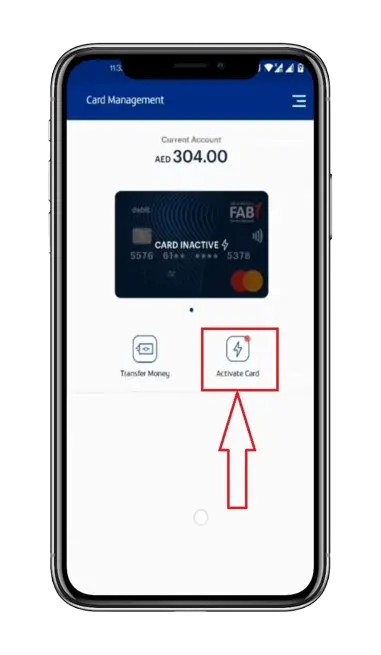
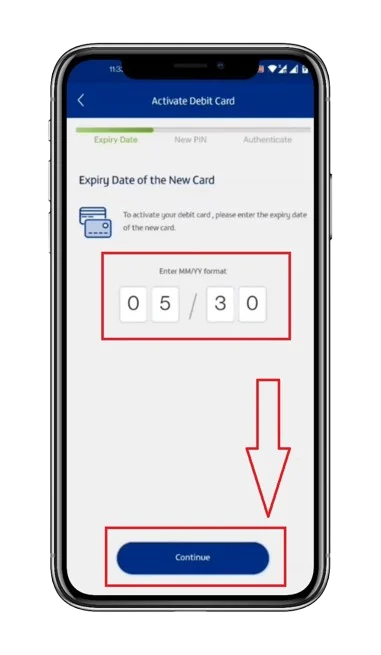
- Type the expiry date of your new debit card in MM/YY format.
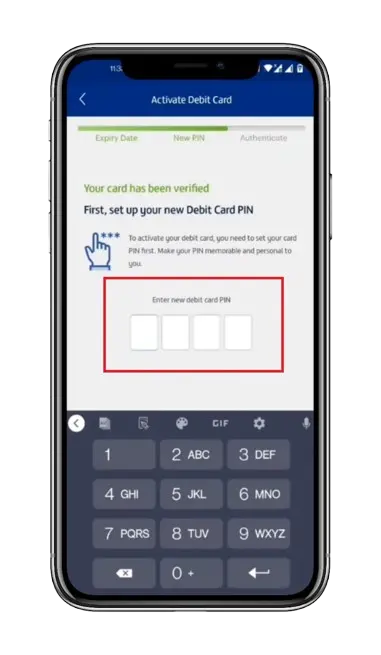
- Set up a new PIN for your debit card.
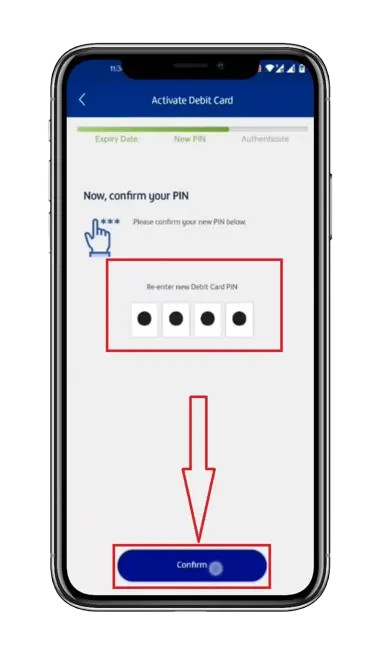
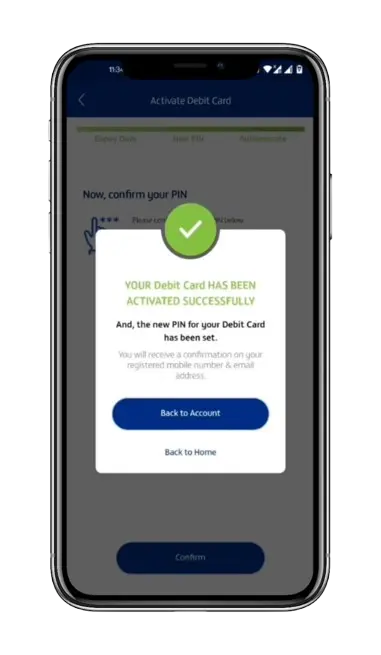
- Confirm your PIN by clicking on the “Confirm” button.
- Swipe on the screen.
- Type in your 6-digit FAB Mobile App PIN.
- Bingo! Your debit card has been successfully activated.
Activate Your FAB Debit Card using FAB Online Banking
Steps:
- Open the FAB Bank official website.
- Log in or register at the FAB Bank website.
- Go to the “Cards” section.
- Touch the “Activated Card” tab.
- Continue with the next on-screen prompts.
- At the end, when your card is activated, you will receive a confirmation message and an email to your registered email.
Activate Your FAB Debit Card at the ATM
Steps:
- Get to your closest First Abu Dhabi Bank ATM.
- Insert your debit card into the insertion slot.
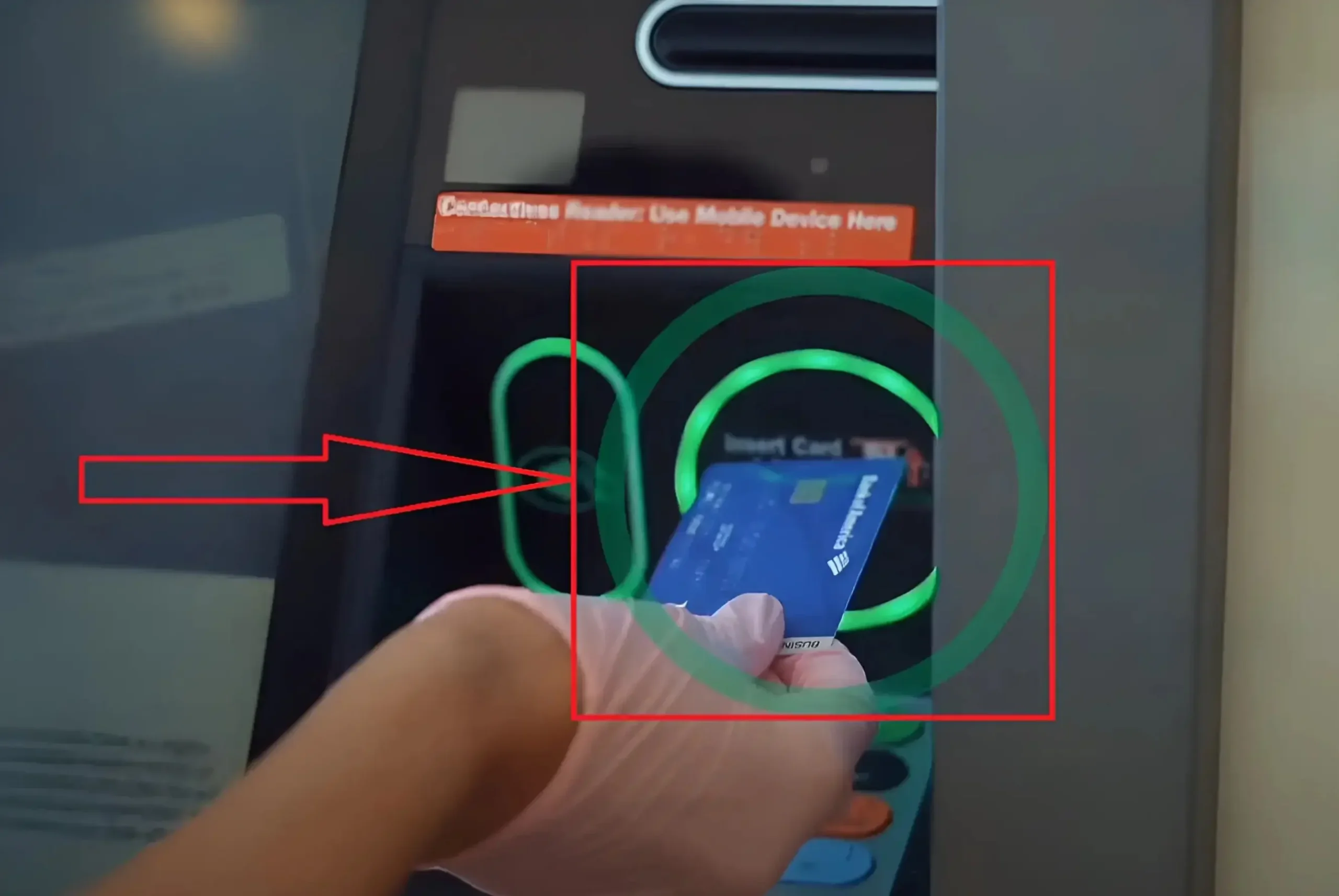
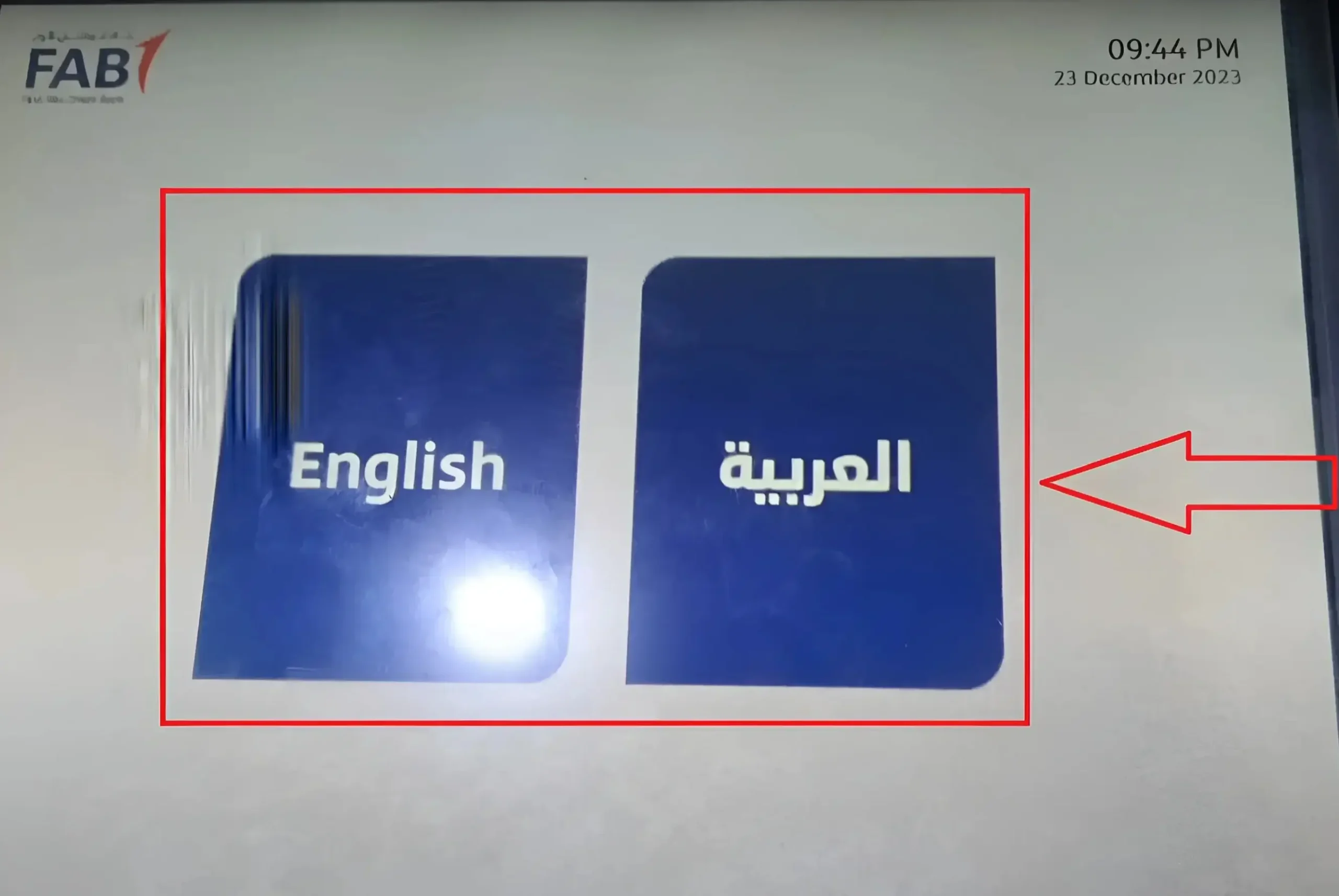
- Touch your preferred language from English and Arabic.
- Click on the “Set a PIN” option.
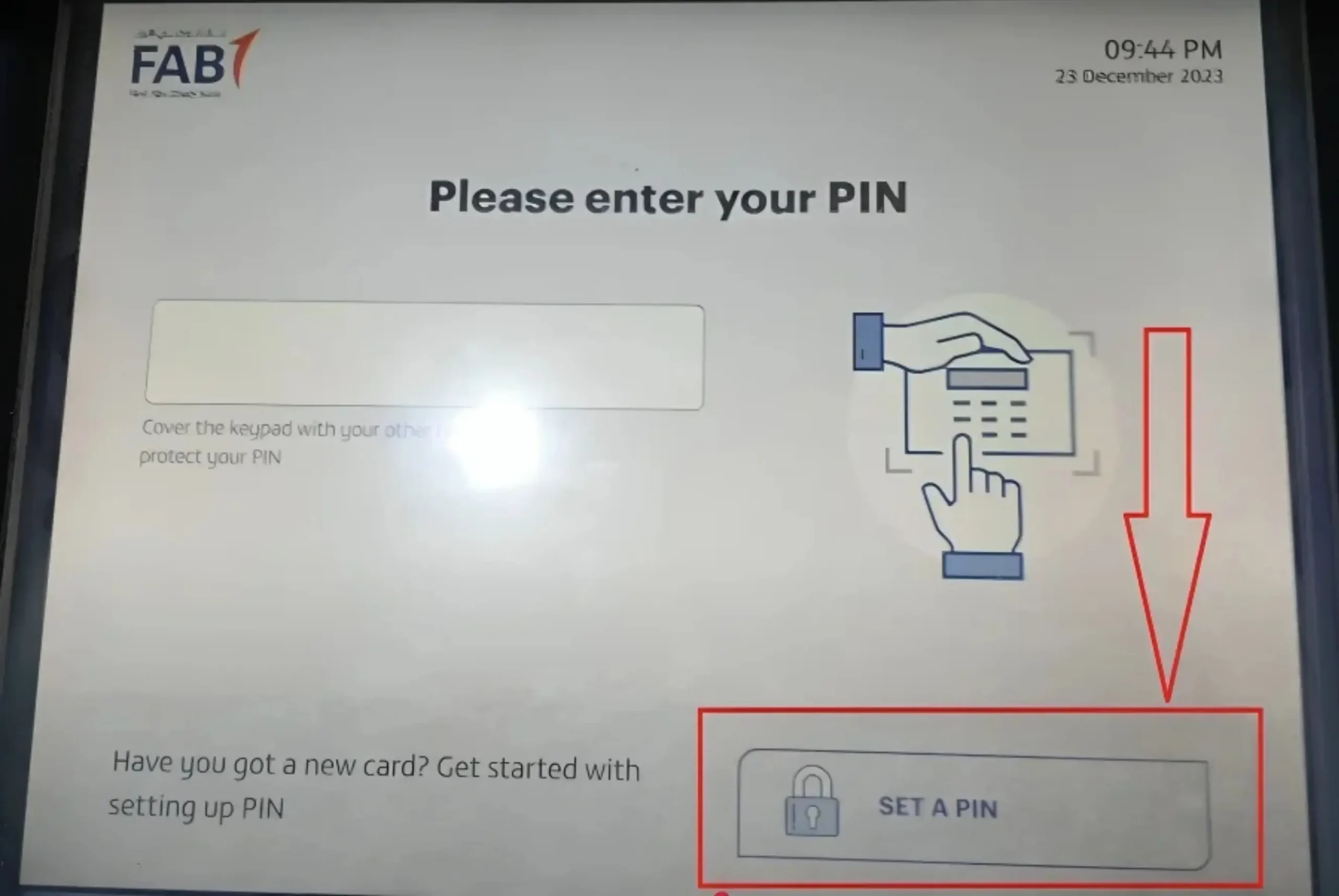
- Enter your new debit card PIN.

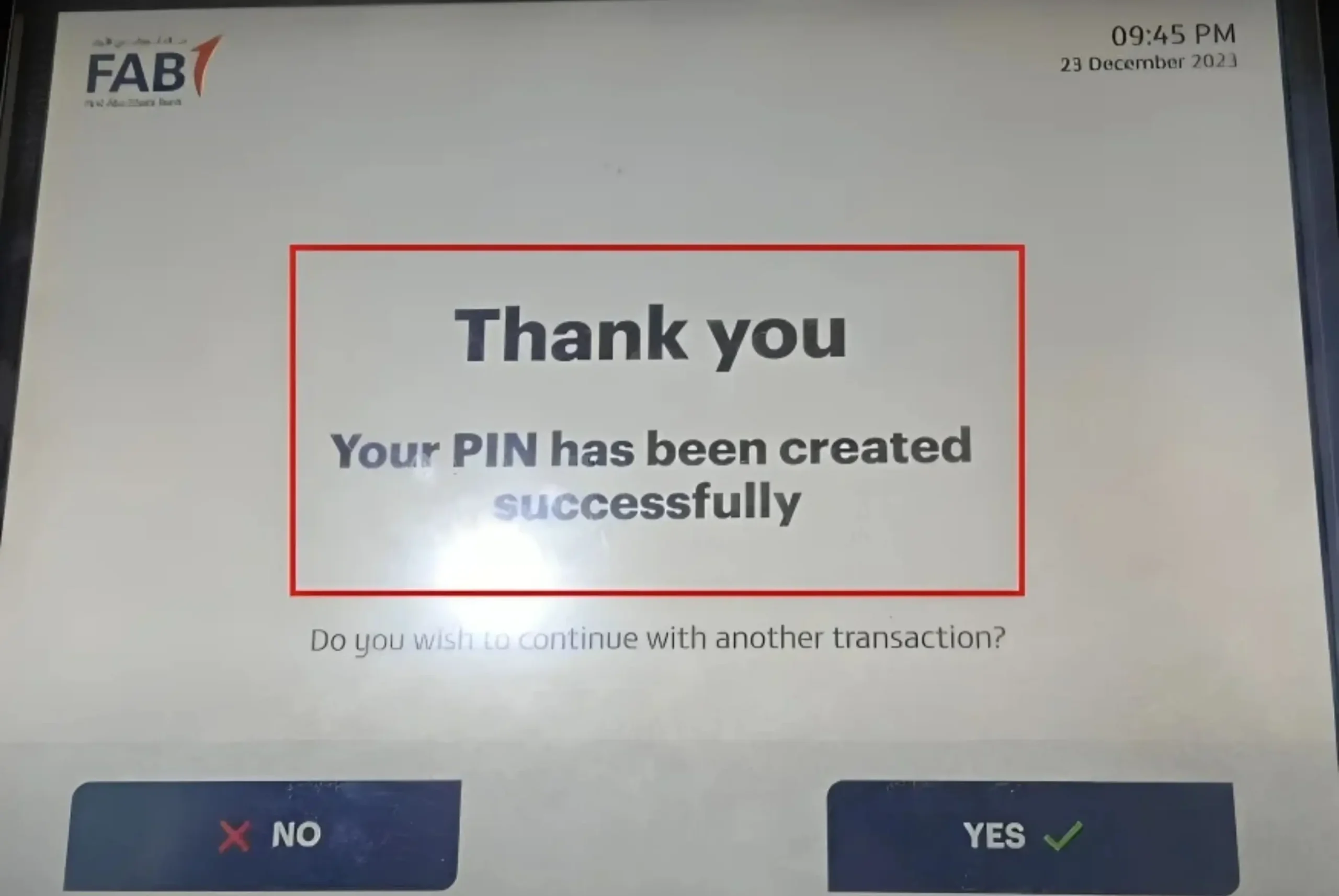
- Re-enter your debit card PIN to confirm.
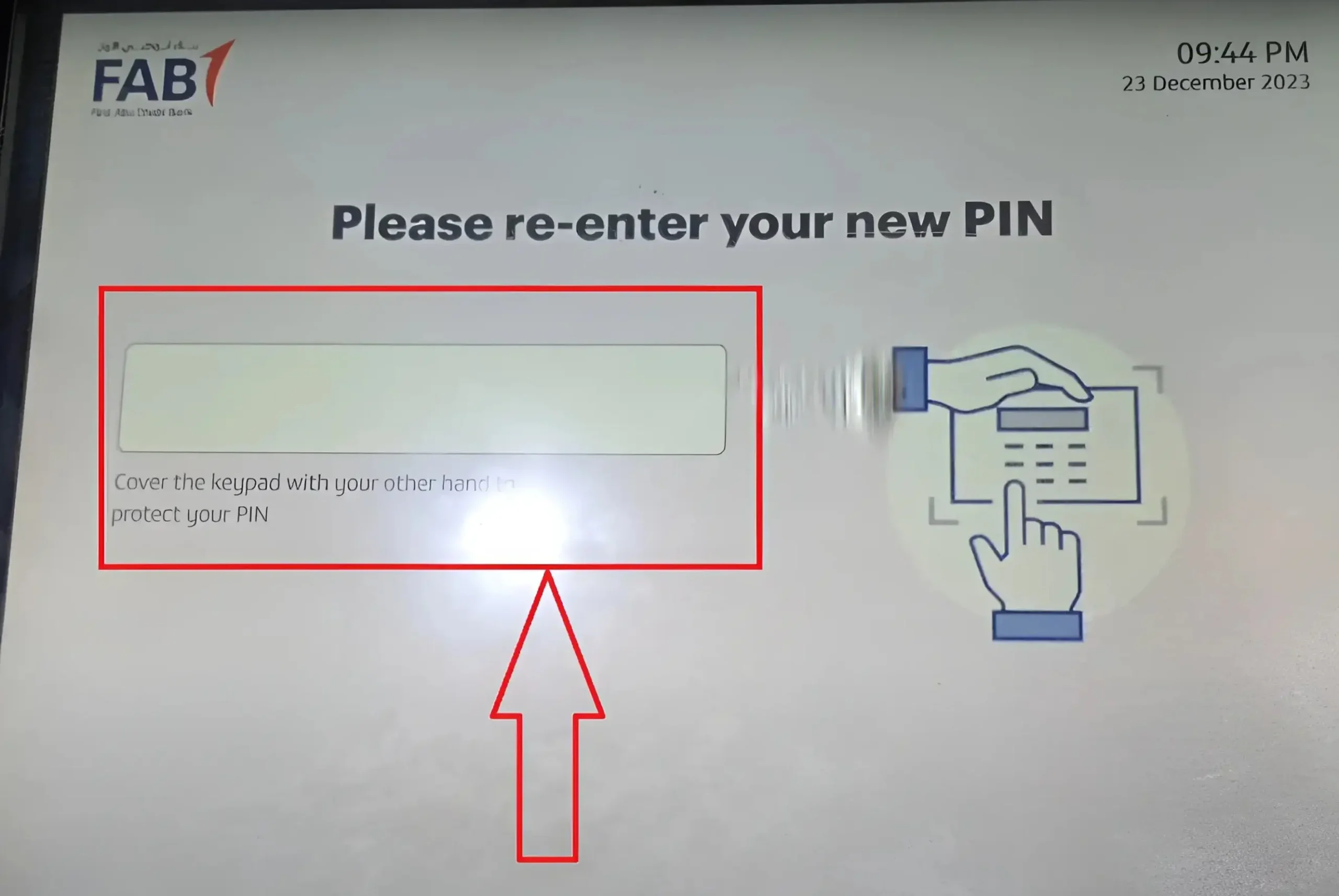
- Congratulations! Your debit card has been activated successfully.
Activate Your FAB Debit Card using SMS Service
Steps:
- Type a message of “ACTiVATE [last 4 digits of your debit card]”.
- Send this message to 2121, which is FAB’s official SMS service number, using your registered mobile number.
- After a moment, you will receive a confirmation about your debit card activation.
FAB Debit Card Activation through FAB Bank Customer Care Helpline
Steps:
- Daily FAB Bank Customer Care Helpline
- Within UAE: 600 52 5500
- Outside of the UAE: +971 2 681 1511
- State your reason for calling FAB Virtual Agent, i.e, “I want to activate my FAB debit card.”
- Now you don’t need to go through the IVR menu. FAB has launched a new way of calling FAB customer service called FAB Virtual Agent (an AI agent). You just have to talk with it naturally, like you do with humans, and it will resolve your query in just minutes.
- Provide your necessary details for verification.
- Set your debit card PIN.
- The FAB customer support team will activate your debit card when your verification and PIN setup are done. And they will send you a confirmation message to your number or registered email.
FAB Debit Card Activation Benefits – Why It’s Important to Activate
Here are some of the key reasons to activate the debit card:
Safeguarding from Unauthorised Access
The #1 reason behind activating the debit card is to ensure that the card reaches its real owner and is not accessible by any unauthorised person. So when you activate your debit card, it signals the bank that the actual owner of the card has received it, which further enables the bank to start monitoring your transactions.
Enable Card Functionality
The debit card activation enables the card functionality so that you can use it for your daily tasks, such as online shopping, bill payments, using at POS machines, making contactless payments, and cash withdrawals.
Enables Internet Banking
Once your card is activated, you will be able to easily manage it using FAB digital banking channels such as FAB Mobile and FAB Online Banking.
Get Access to Exclusive Benefits
With the activation of your card, you are given access to the following debit card-specific benefits:
Resolve Common Issues that come up during FAB Card Activation.
Card is not Recgoneized
If you get this error that your card is not recognised, then your card is not yet linked to the First Abu Dhabi Bank system. So, just have to wait at least 24 hours, and it will be activated. If it doesn’t, you can contact FAB customer care at 600 52 5500.
Mobile App and Online Website Not Working
If the FAB mobile app or official website is not responding, then the following can be the issues behind this behaviour:
So the solution to this problem is, first of all, to update the FAB app from your app store. Clear your Mobile or browser cache memory. Make sure your internet connection is good. And then use the app or website, they will definitely start working properly.
No Confirmation Message
Sometimes, you may face the issue of not receiving the confirmation message. The reason behind this problem could be that you didn’t complete the process, or there was some network delay.
The solution to the first problem is to make sure you complete the message sending process. And in case of network delay, just wait for some time, and you will receive the message.
If the issue persists, you should try other easy and quick methods, such as FAB mobile and an ATM visit.
Conclusion:
That was all about FAB debit card activation. Just select the method that feels accessible and convenient to you, get to the steps section, and apply those instructions to activate your card instantly.
However, if some methods don’t work due to any issue or take more time, then the recommended methods to activate your card instantly are the FAB Mobile App and the FAB official online website. With their help, you can activate your debit card in just seconds.
FAQs: Frequently Asked Questions
How long does it take to activate a FAB Debit Card?
The debit card activation time depends on the method you’re using. If you are activating it using the FAB Mobile App, it will just take you a few seconds to do so.
Can I activate my FAB Debit Card abroad?
Yes. You can activate your FAB debit card even if you are outside of the UAE. Use methods such as FAB Mobile App, FAB Online Banking, or visiting an ATM.
Do I need a FAB account to get a FAB Debit Card?
Yes. FAB debit cards are usually linked to FAB accounts. So you definitely have to open an account to be able to access a debit card.
Does the FAB Bank charge any fee for Debit Card activation?
No. FAB doesn’t charge any fee for your debit card activation.
Can I change my PIN during activation?
Yes, you can change your PIN during card activation.