
Ratibi Card Salary Check: Easy Ways to Check Your Balance (PPC, App, ATM, Online & More)
How can you check your Ratibi card salary or the balance of any other prepaid card? Want to inquire about your balance instantly, both online and offline?
If that is what you want, then here we have this up-to-date, step-by-step, and COMPLETE guide for you, which covers a variety of methods such as PPC Inquiry portal, Payit app, SMS, Helpline call, ATM (and more), and answers each & every question regarding your balance Inquiry.
Furthermore, this guide helps you either way, whether you want to view your Ratibi card or other FAB prepaid cards (such as Nafis, DWallet, ADSSA, etc.) balance.
Without further delay, let’s jump into today’s latest guide on checking your Ratibi card salary.
8 Easy and Proven Ways to Check Your Ratibi Card Salary
From now onward, we’re going to start our 8 ways to check the Ratibi card salary. Some of these methods require an internet connection, and others don’t.
The methods that require an internet connection are 2, 3, 5, and 8. And others that don’t are 1, 4, and 7.
Method 1: Ratibi Card Salary Check via the PPC Inquiry Portal (Fast & Free)
Steps:
- Visit Website: Go to the PPC Enquiry website -> Search “PPC Enquiry Portal Magnati”
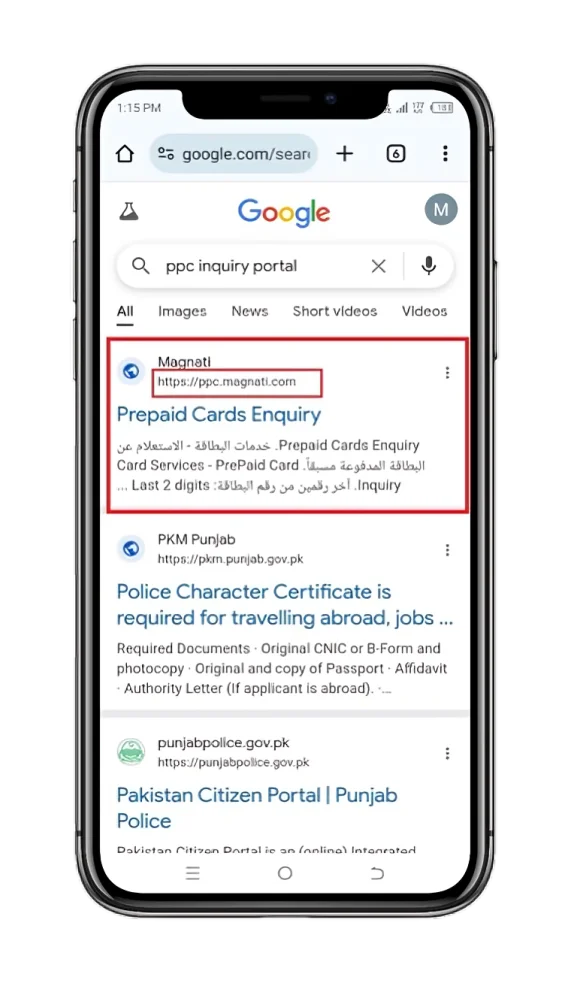
- Enter two digits: Look for the last 2 digits of the card number and enter them in the small box.
- Enter Card ID: In the big box, enter your Card ID number.
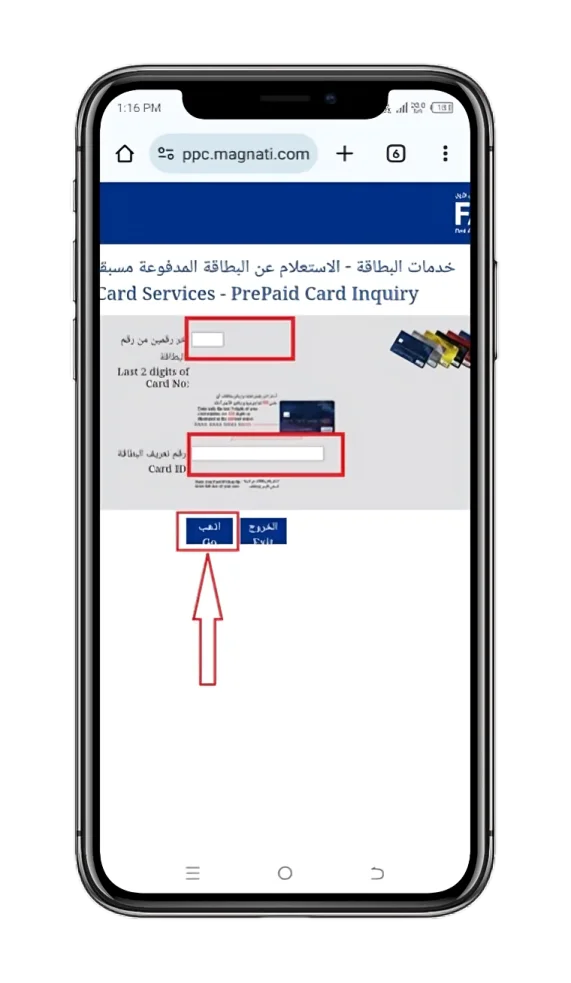
- “Go”: Now, tap on the “Go” button.
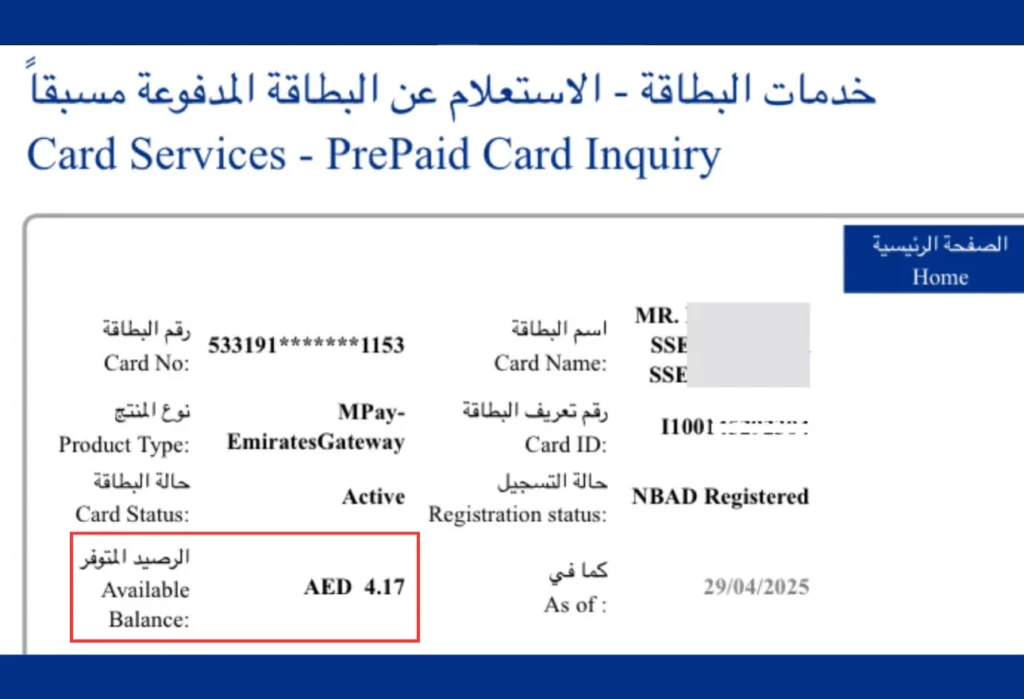
- Know your salary: You can now view your balance in the “Available Balance” section.
Method 2: Ratibi Card Salary Check through SMS Banking
Whether you are in an area with no internet or offline, you can still view your Ratibi card salary using the SMS Alerts option.
Requirement for the Balance Checking through SMS Banking
The only requirement is that your phone number should be registered with FAB. If not? Contact FAB customer support or visit a nearby First Abu Dhabi Bank (FAB) branch to register it.
Steps:
- Compose an SMS: Only type your 13-digit Ratibi card number, which is located on the front of the card.
- Send it to 2121: Send this message to 2121 through your registered number.
- Your Ratibi Card Salary Message: A message with your Ratibi card balance will be sent to your Phone.
Method 3: Ratibi Card Balance Check through the FAB Mobile APP (With Screenshots)
FAB Mobile Banking lets you perform your day-to-day banking operations using an app-based Interface. And guess what? You can also check your available amount on your Ratibi Card using it. That too in real-time.
Steps:
- Download the Bank FAB Mobile App.
- For Android: Google Play Store.
- For Apple Devices: App Store.
- For Huawei: Huawei AppGallery.
- Login or Register:
- Login: If you are already a FAB App user.
- Enter your username/email/user ID & password. Or log in using your Ratibi card and other personal information.
- You will receive an OTP (One-Time Password) code via email or text message to your phone number. So make sure to enter it.
- Then complete the remaining easy steps to log in.
- Register: It is for the new users of the app.
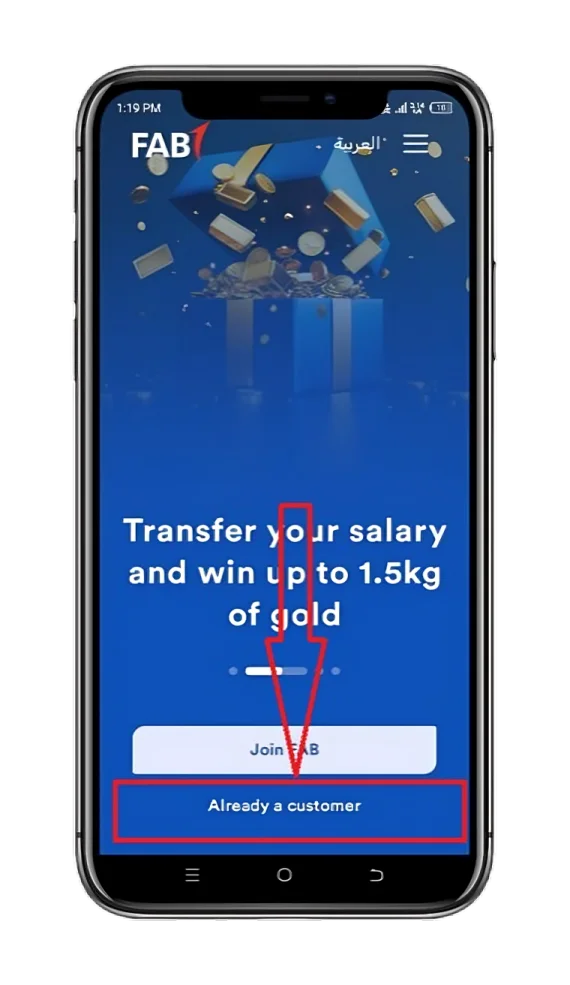
- Tap “Already a customer”.
- Then complete the next steps to register.
- Login: If you are already a FAB App user.
- Click on the ‘Cards’ tab: On the home screen, tap on the “Cards” option fixed at the bottom of the screen.
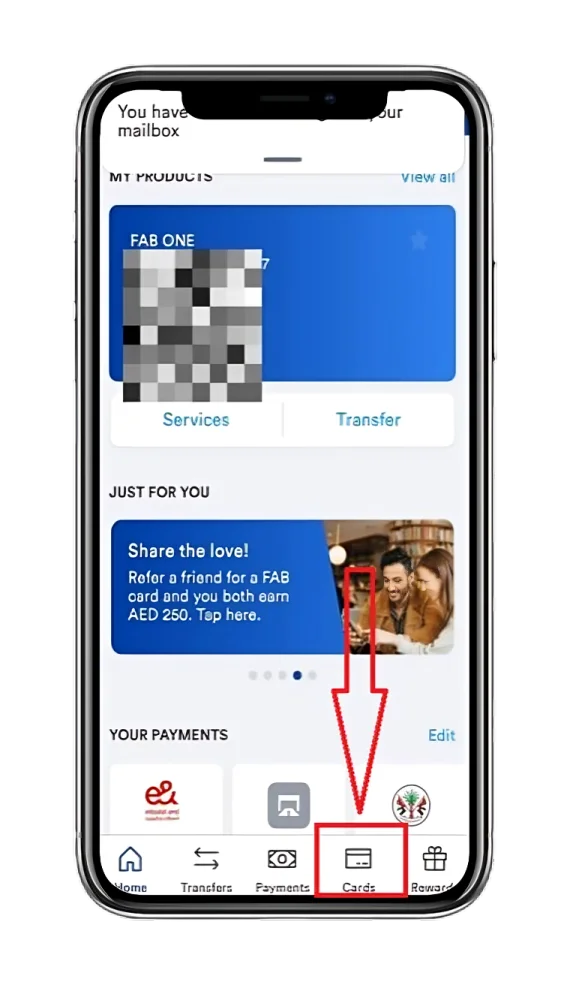
- Select the Card: Select your specific card—be it Ratibi, Nafis, or any other FAB prepaid card.
- View your Card Salary: Look for the “account summary” or” available balance” section to see your card amount.
Method 4: Ratibi Card Salary Check via FAB Online Banking (Best for PC Users)
If you’re a PC (laptop, desktop) or mobile user, then checking your Ratibi card salary through the Online Banking is the best and safest way for you.
Steps:
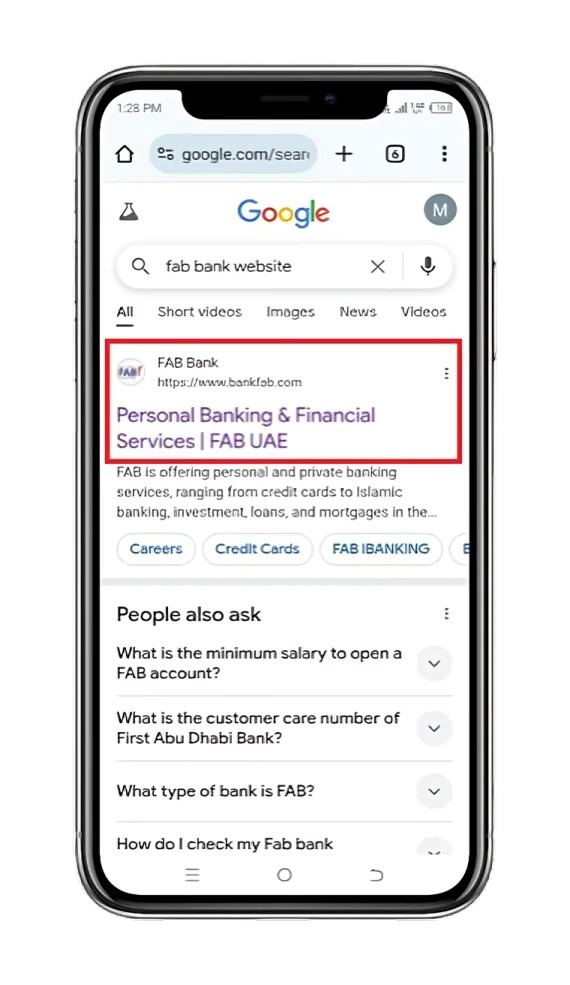
- Browse the Website: Open the Bank FAB Official Website.
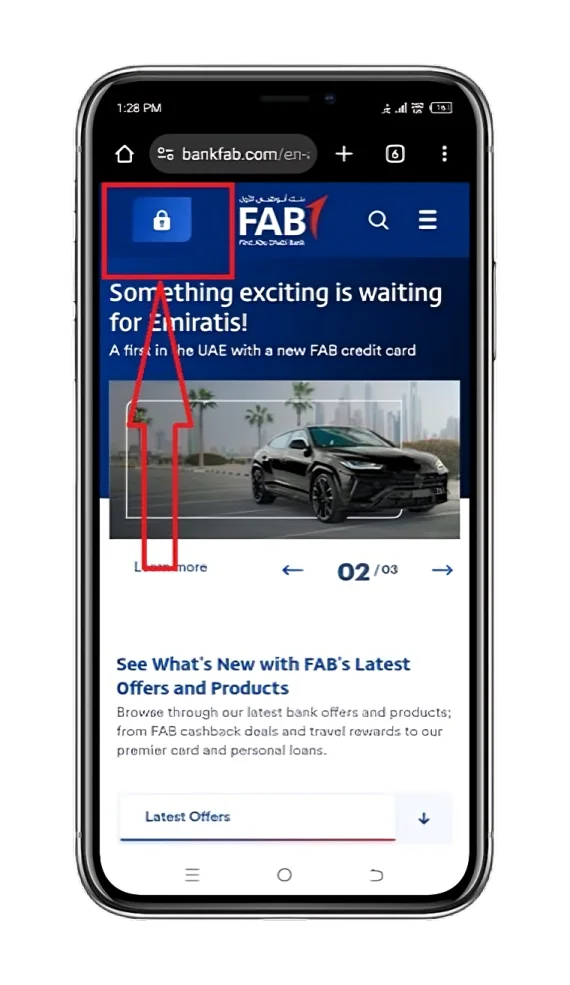
- Login Button: Press the “Login” button (represented by a lock icon).
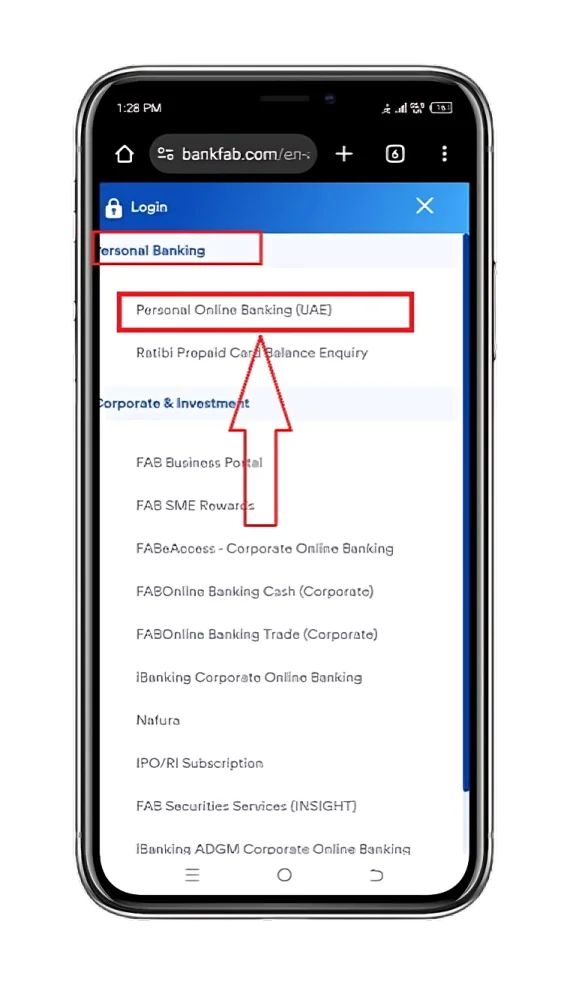
- Click on “Personal Online Banking (UAE)“: It is present under the “Personal Banking” section.
- Log in or Register:
- Log in (already registered):
- Fill the input boxes with your “Username” & “Password”
- Tap on the “LOGIN” button.
- Log in (already registered):
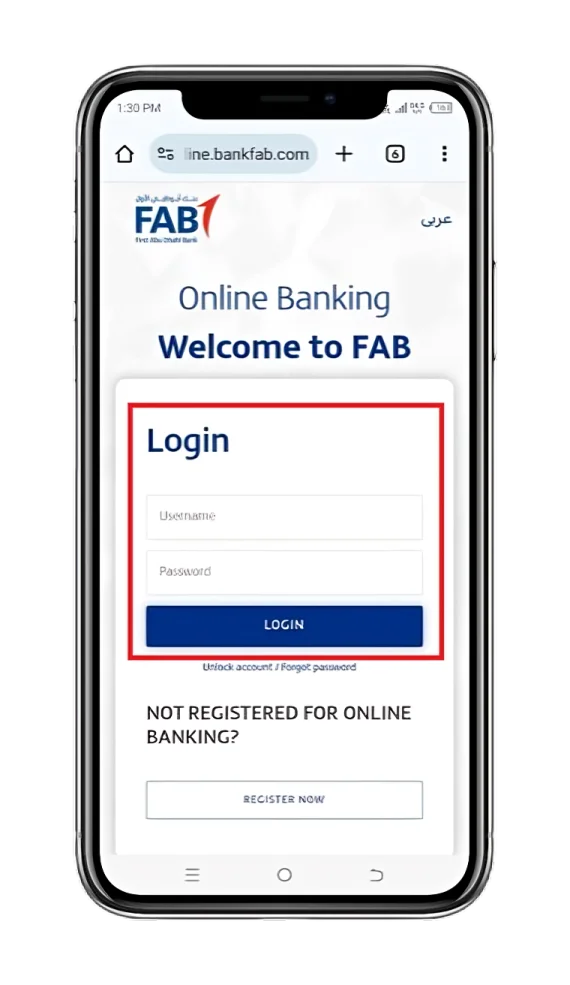
- Register (new user):
- After pressing the “Register Now “button, simply complete the next 4 steps for a successful registration.
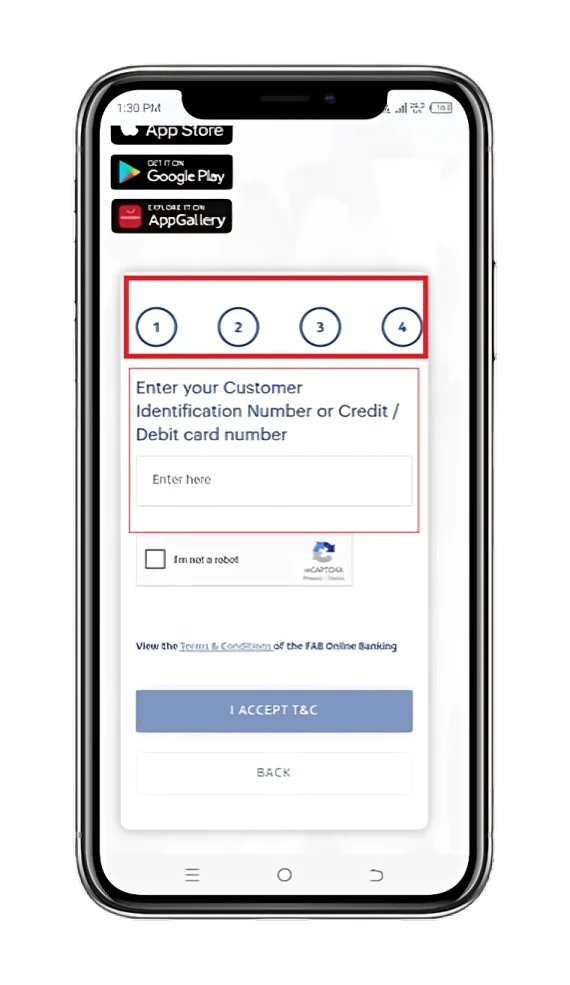
- Click to choose the Ratibi Card: Now, select your Ratibi card from the “Accounts” or “Cards” section.
- View your Salary: See your card remaining amount in the “available balance” section.
Method 5: Ratibi Card Salary Check Using an ATM
If you are in a no-internet area, don’t have a smartphone, and still want to review your Ratibi card salary, then using an ATM is an effective and convenient way to do so.
Steps (With Proper Screenshots):
- Visit ATM: Head over to your nearest Bank FAB ATM.
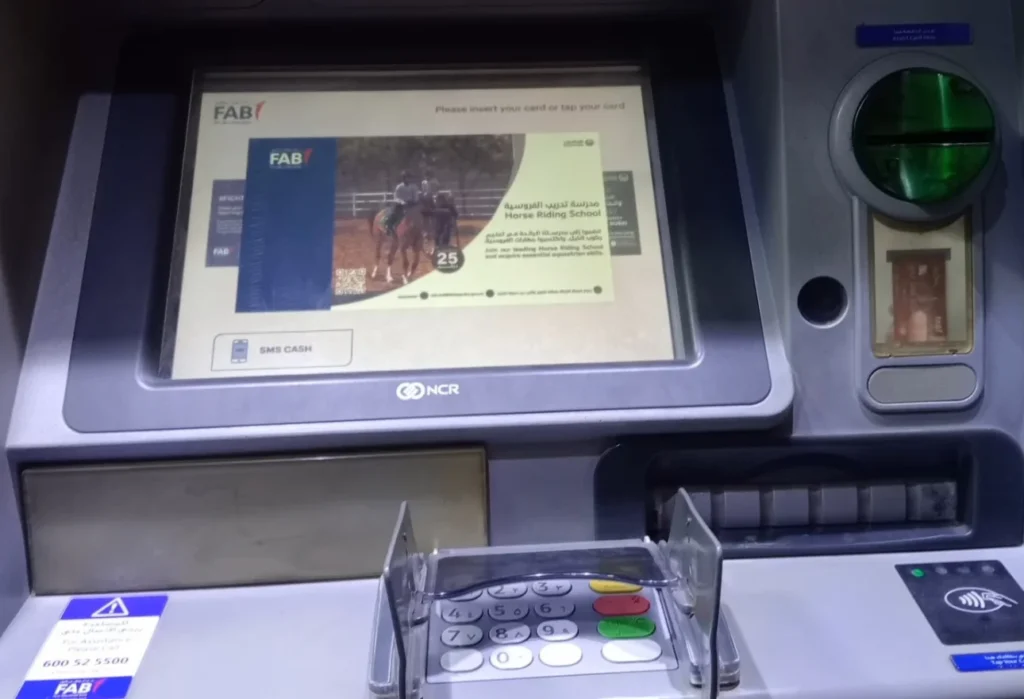
- Put your Card into the ATM: The Option is Present under the “Insert Card” section.
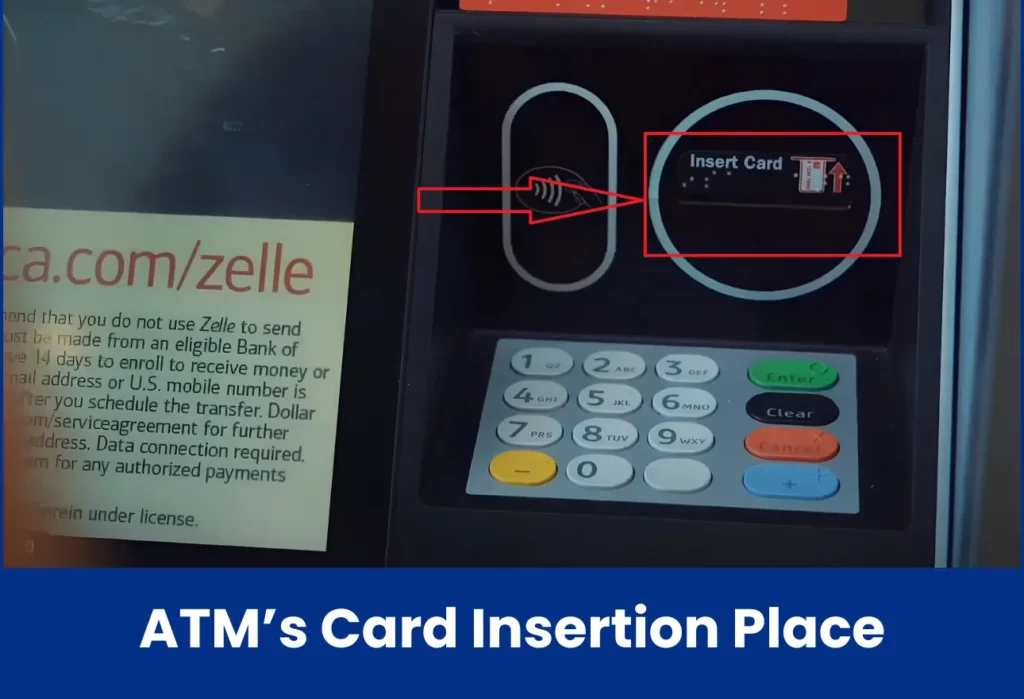
- Touch your Preferred Language option: You are given two options—English & Arabic.
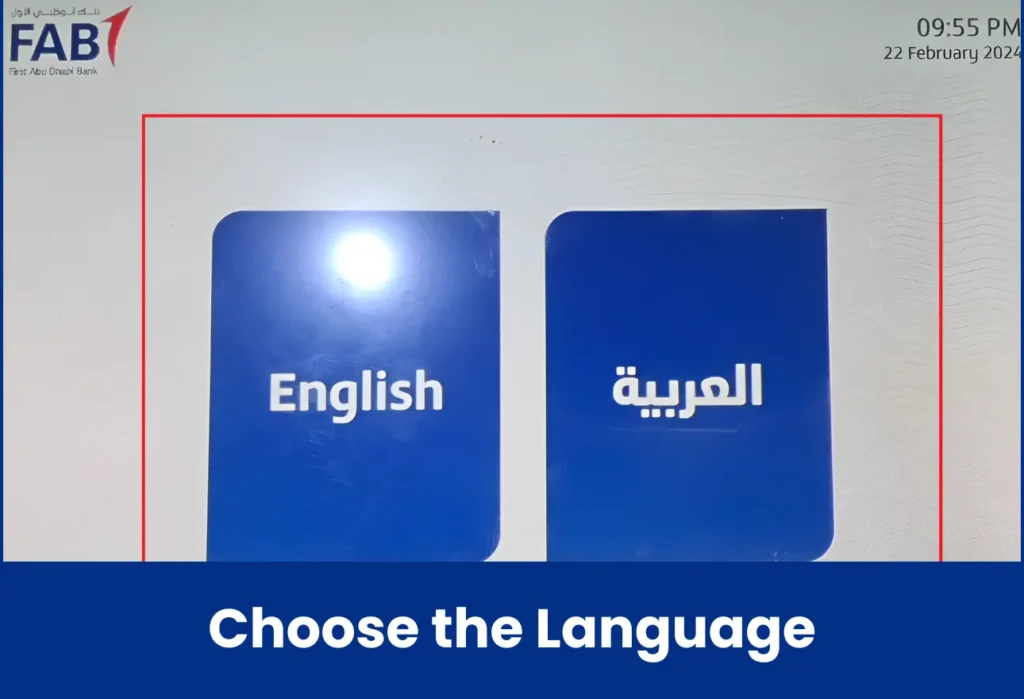
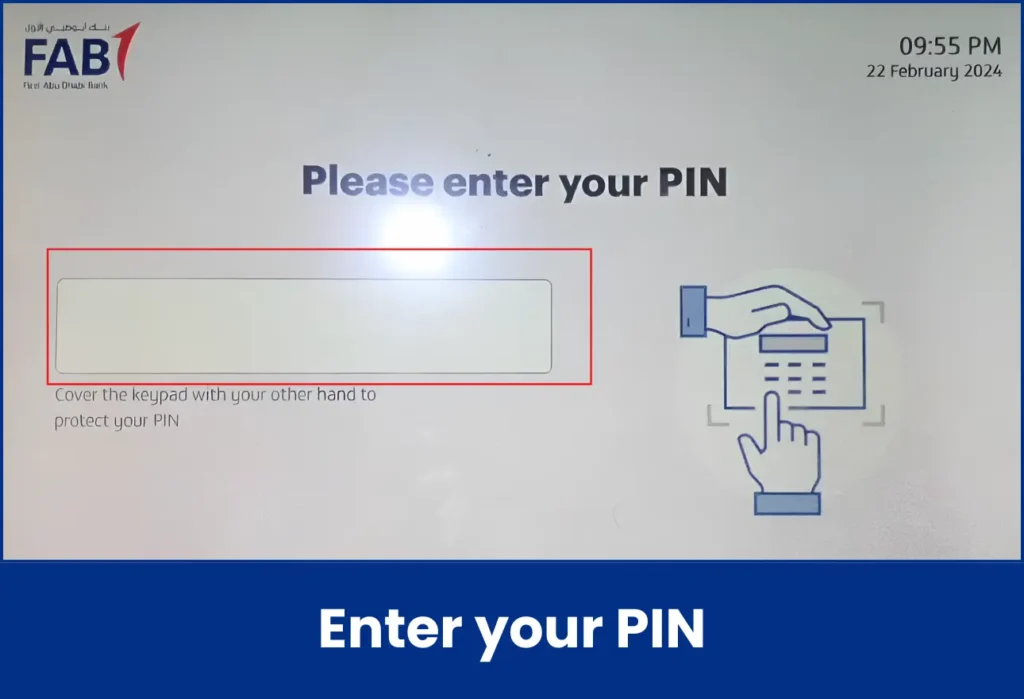
- Type PIN: Enter your Card PIN and click the green “Enter” button.
- Go with the “Balance Inquiry”.
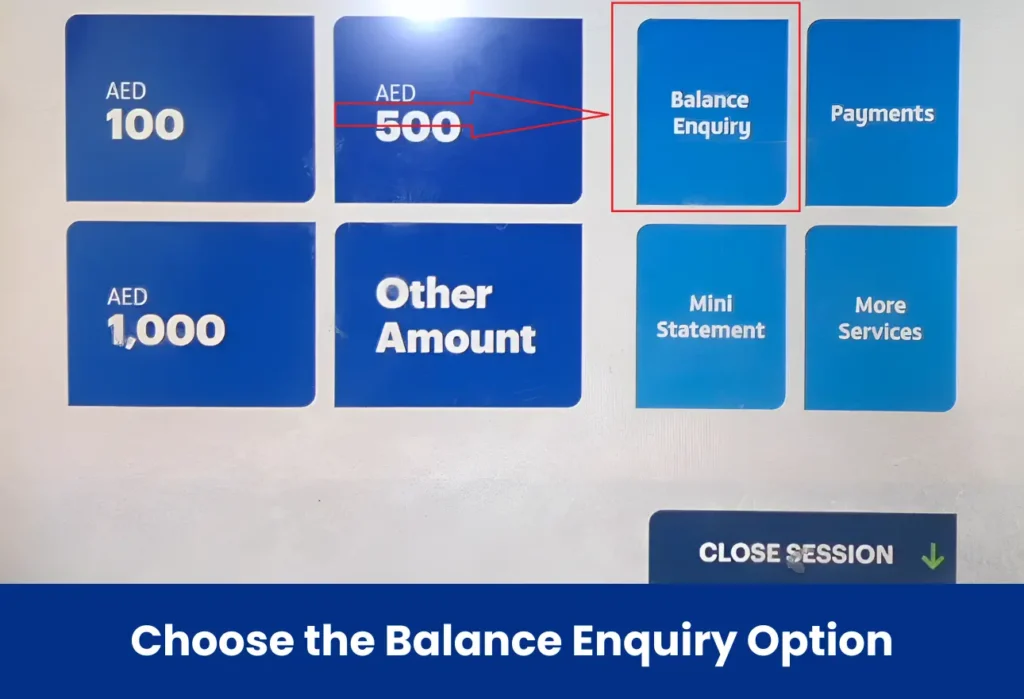
- Choose the “Display On Screen”.
- Know your Card Pay: You can view your available Ratibi card salary.
- Print Receipt (optional): Click “Print Receipt” if needed.
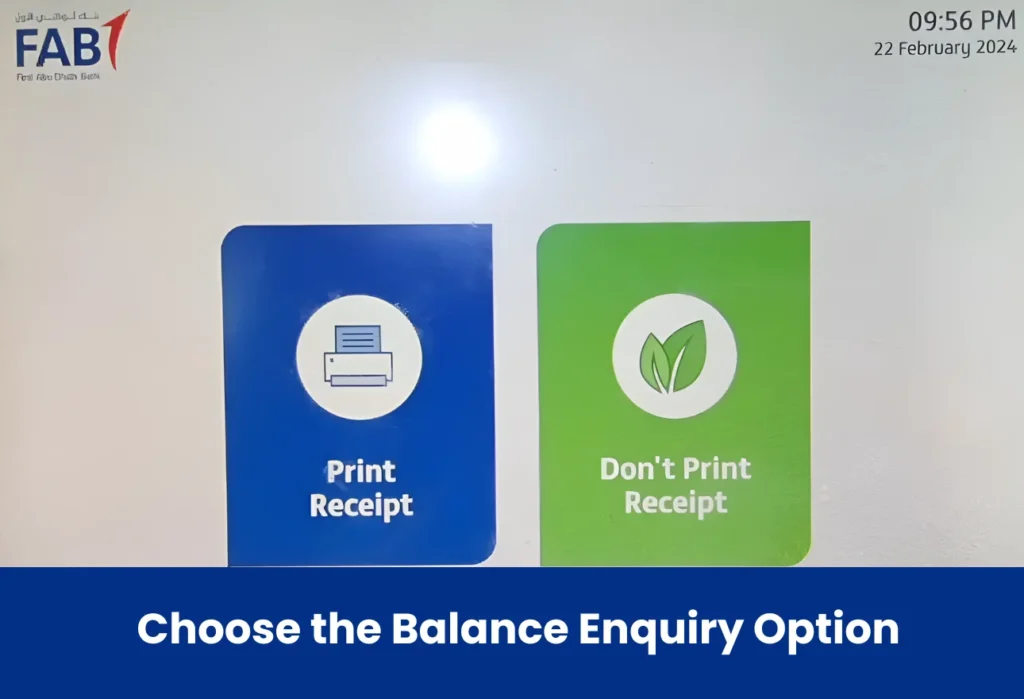
Pro Tip: Make sure to visit the “FAB Branch & ATM locator tool” in order to find your closest ATM.
Method 6: Ratibi Card Salary Check via Payit Wallet App
Payit Wallet App, powered by Bank FAB, lets you check your Ratibi Card income in a safe and secure environment.
Just link your FAB Prepaid Card (Ratibi or others) to it and know your available card amount easily.
Steps:
- Install the App :
- On Android: Google Play Store.
- On iOS (iPhone): App Store.
- On Huawei devices: Huawei AppGallery.
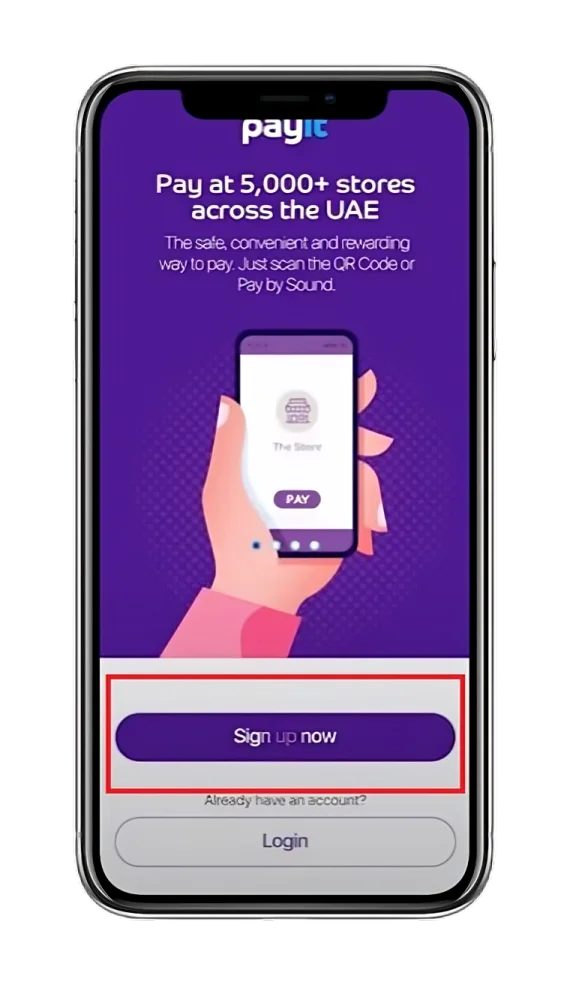
- Sign up: Tap on the “Sign up now” option.
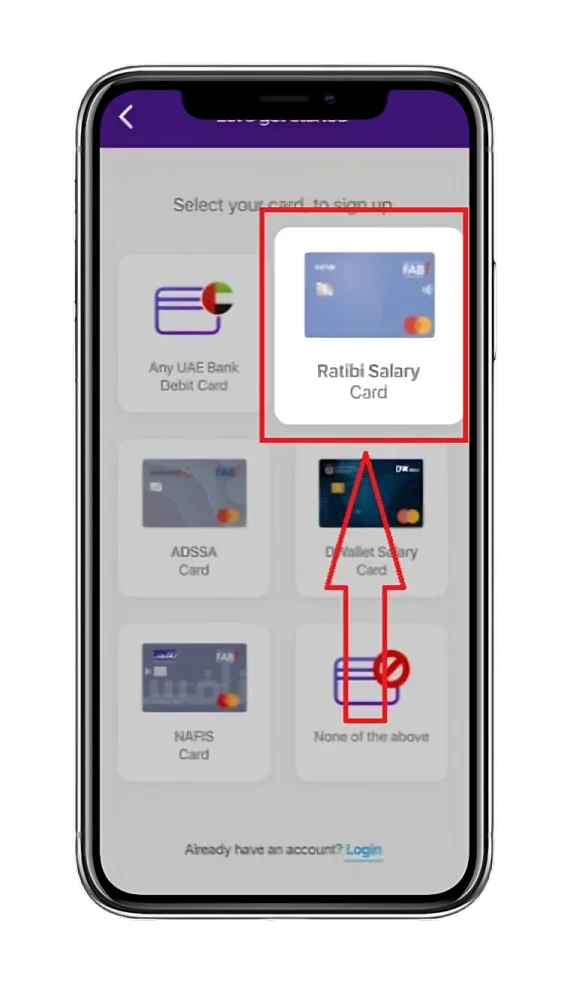
- Select the Ratibi Salary Card: Alternatively, you can choose other FAB Prepaid cards, such as Nafis and ADSSA.
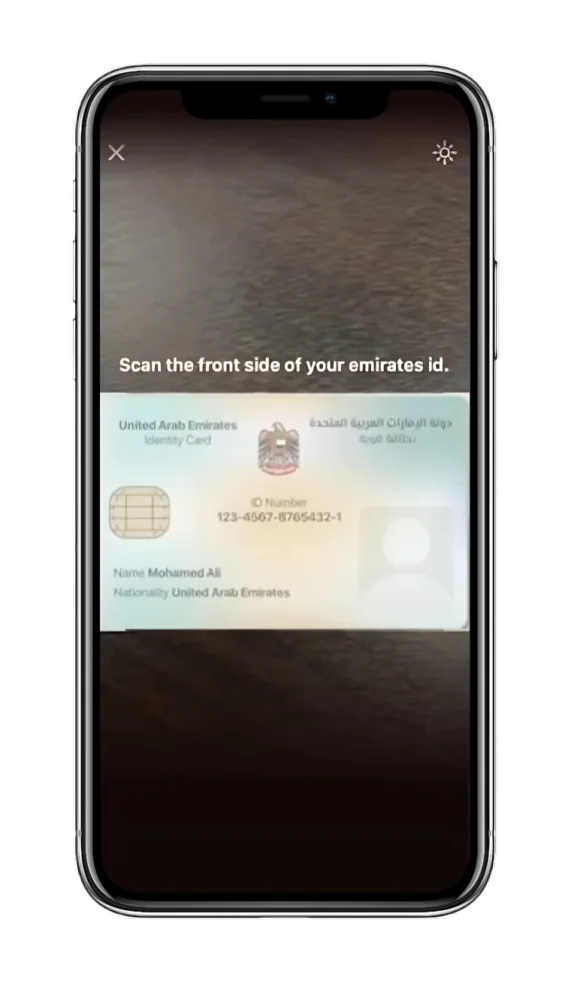
- Scan ID: Now, scan your Emirates ID and then tap the “Confirm” button.
- Verify yourself by recording a Video: This is for security. Ensure you follow this by reciting the sequence of numbers during the video.

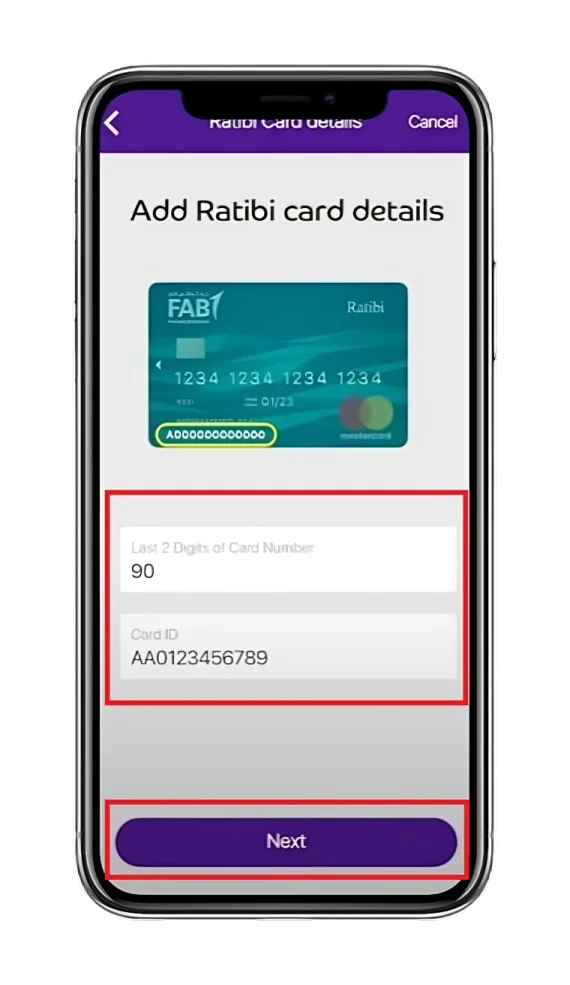
- Add your Prepaid Card Details:
- In the 1st box, enter the last 2 digits of the card number.
- In the 2nd box, enter your Card ID.
- Click the “Next” button.
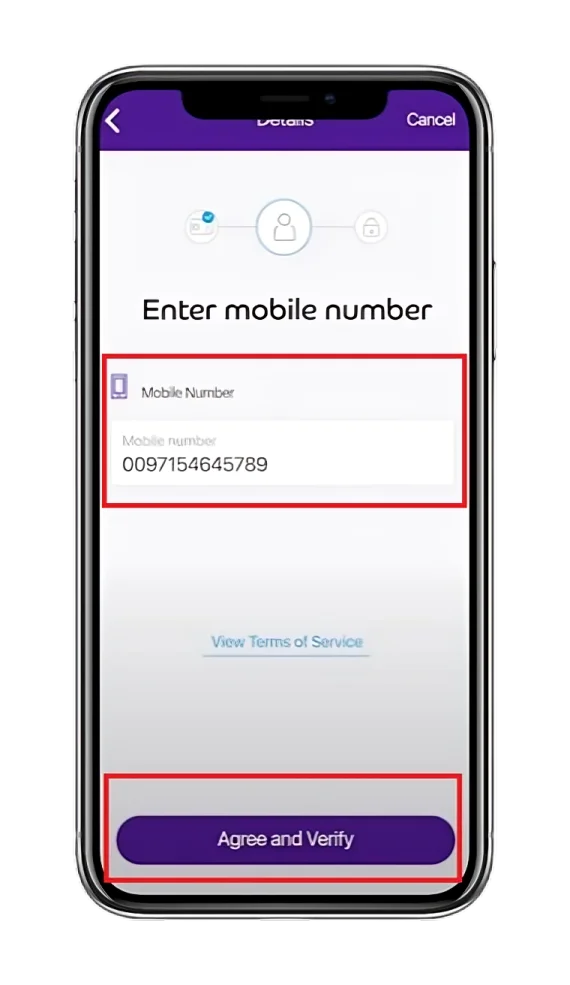
- Enter Mobile Number: Enter your number and click “Agree and Verify”.
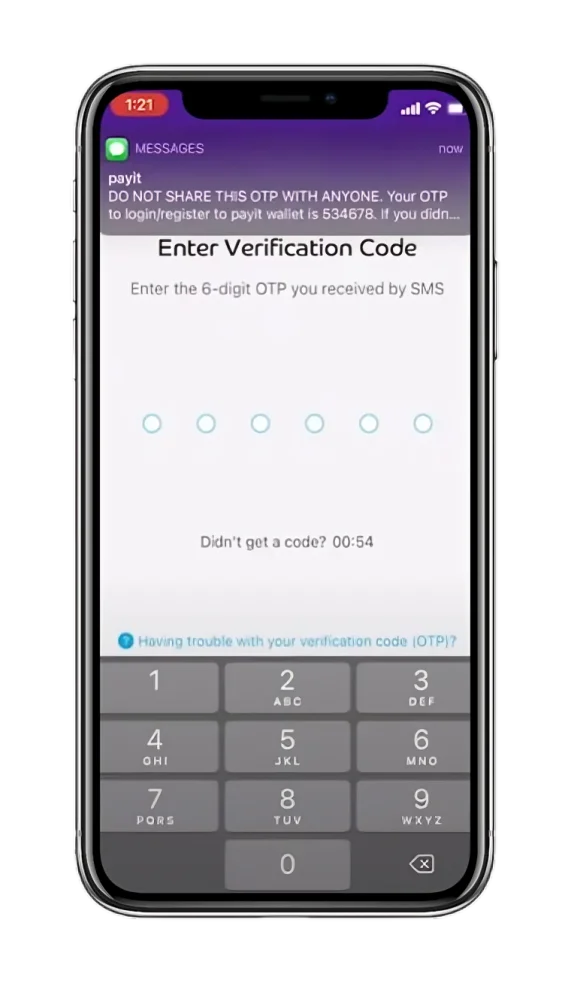
- Enter OTP Code: Enter the One-Time-Password(OTP) sent via SMS.
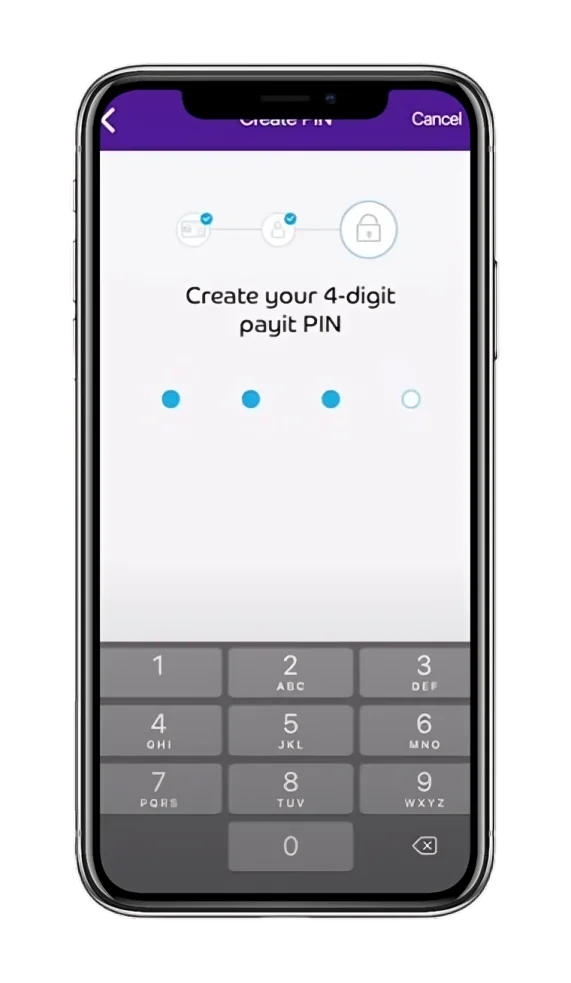
- Set Your Unique PIN: Set your 4-digit PIN and then retype it to confirm.
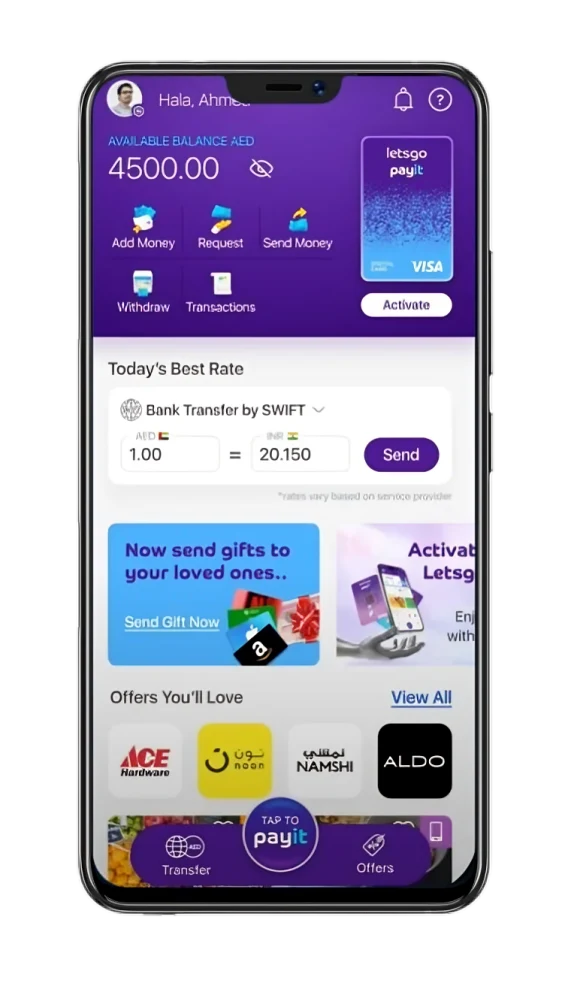
- View your Card Income: Click “I’ll do it later” and see the balance on the home screen.
Method 7: Ratibi Card Salary Check at the FAB Branch
For individuals who prefer to check their Ratibi Card salary in person or offline, visiting a FAB Branch is one of the easiest options. Implement the steps below and receive your balance information within minutes.
Steps:
- Pick the Necessary Documents: You will need to keep your Emirates ID and Ratibi Card with you.
- Go to a Branch: Rush to your closest Bank FAB Branch.
- Talk to the Teller: Approach the bank teller to request a balance inquiry.
- Verify yourself: Give them your Ratibi card and Emirates ID details.
- Card Balance: After verification, get your Ratibi card’s salary status.
Pro Tip: Don’t know about any nearby FAB branch? Use “FAB Branch Locator” to find an accessible branch according to your location.
Method 8: Ratibi Card Salary Check using Telephone Banking (For Non-Tech Users)
If you’re a non-tech user or want to talk to a bank agent to know your Ratibi card salary, then there is none better than the FAB Telephone Customer Support option.
Steps:
- Call the Ratibi Service helpline:
- For UAE residents: 600522298
- For International customers: +971(2)4996279
- Talk: Now, you naturally have to talk to the FAB Virtual Agent (AI-based latest feature).
- Request: Ask for Ratibi’s card salary inquiry.
- Follow: Follow the IVR (Instant Voice Response) instructions.
- Provide Essential Information: Please tell the agent your Ratibi card details.
- Know the Balance: Get your Ratib card salary info on call.
How to check the balance of the other FAB Prepaid Cards?
You can check your other FAB Prepaid Card balance using the FAB App, the PPC Magnati Inquiry website, FAB Customer Support, Payit Digital Wallet, or ATMs.
In summary, all the above methods for checking Ratibi salaries also apply to other FAB Prepaid cards.
Worth a look: Remember this main guide on FAB balance checking is always available, offering multiple ways for balance inquiry for all FAB customers.
What’s the difference between a Ratibi Card and a FAB Salary Account Balance Check?
Ratibi is the FAB payroll card, which allows you to avoid maintaining a dedicated bank account by providing access to some banking services.
On the other hand, the FAB Salary Account is a standard bank account that provides access to all banking services.
In fact, in terms of the income check, you can use the same methods for Ratibi as well as for the salary account balance inquiry. What separates them from each other is the nature of the account. Ratibi is card-based, while the salary account is a full-fledged banking solution.
Ratibi Card Salary Check Methods Comparison
| Method | Inquiry Speed | Online/Offline | Inquiry Charges | Requirements |
|---|---|---|---|---|
| PPC Magnati Portal | Instant | Online | Zero | 1. The last 2 digits of the Card No. 2. Card ID. |
| FAB App | A few seconds (If already logged in). | Online | Zero | 1. Mobile app account. 2. Login credentials. |
| Online Banking | A few seconds (If already logged in). | Online | Zero | 1. FAB account. 2. Login credentials. |
| Payit App | A few seconds (If already logged in). | Online | Zero | 1. App. 2. Physical Ratibi card. 3. Emirates ID. 4. Card ID. |
| SMS Banking | 1-3 minutes | Offline | Only SMS charges | 1. UAE registered phone number (DU & Etisalat only). |
| ATM | 1-2 minutes | Offline | Zero at FAB ATMs | 1. Ratibi card. 2. PIN. |
| Telephone Banking | 3-5 minutes | Offline | Calling charges | 1. Mobile phone. 2. Ratibi’s card details. |
| FAB Branch | Depends on the branch. | Offline | Zero | 1. Ratibi card. 2. Emirates ID. |
What are the benefits of checking the Card Income Regularly?
Smart Budgeting and Spending:
Regularly tracking your card income helps you spend wisely. Because every time you check your balance, you ensure that you plan your budget strategically and spend carefully. Result? Zero unnecessary spending.
Helps in Detecting Unauthorised Transactions and Gives You Peace of Mind:
Detecting any suspicious and unverified money transactions becomes easy. You can immediately detect any unauthorised transaction and inform the bank to take immediate action. Hence, your money remains safe & secure, and you enjoy peace of mind.
Best Tips for Safe Balance Checking
By acting upon the following precautionary measures, you can have a secure balance-checking experience:
Troubleshooting Ratibi Card Salary Inquiry Issues
Website Not Working
If the website is not opening correctly, maybe there’s a glitch or a temporary server issue. Don’t panic; it’s normal. Just try again after some time.
ATM Swallowed the Card:
Immediately head over to the relevant branch and inform them about the situation.
Forget the Login Password:
If you’ve forgotten your login password, simply click” Forget PIN?” and follow the next steps.
What is a Prepaid Card?
It is a banking card that does not require a dedicated bank account. You simply load it with money and use it for future withdrawals or purchases.
Moreover, it frees you from overdrafts and debt, as you only spend the amount loaded onto the card.
Why Should You Use FAB Prepaid Cards?
A prepaid card offers you the following valuable advantages:
What are the Prepaid Cards Offered by the FAB?
First Abu Dhabi Bank provides its customers with a range of prepaid cards, each designed to address a specific customer need.
| FAB Prepaid Card Name | Best For | Key Benefits |
|---|---|---|
| Ratibi | Employees earning up to AED 5,000. | Salary payroll solution without needing a bank. |
| DWallet | Domestic workers. | Employers can send funds to their domestic workers’ DWallet cards using LuLu Exchange and UAE FTS. It can be linked with TADBEER and the Payit app. |
| Payment Prepaid | Companies handling petty cash and recurring payments. | Allows Unlimited cash withdrawals at ATMs and purchases at POS(Point Of Sale) machines. |
| Prepaid Gift | Gifting and incentive purposes. | No need for KYC (Know Your Customer) info for cardholders. Visa Prepaid Card for gifts and incentives. |
| Multi-Currency | Medical treatment and usage purposes outside the UAE. | It’s a co-branded Visa card. Allows you to perform contactless authentication (using just PIN and Chip). Automatic control of FX (Foreign Exchange) by the card system. |
| General Purpose Prepaid Cards | Government payments and chosen retail transactions. | It’s an enhanced version of the FAB eDirham card. Provides you with Government Sahala, Advanced Individual, Silver Corporate, and Black Corporate cards. |
| Abu Dhabi Pay | Abu Dhabi government transactions. | Access to make retail payments on selected cards. |
| RAK Pay | Ras Al Khaimah government transactions. | The transaction can be completed using either the Wafer Individual or the Al-Ruzmah Corporate Card. |
| UAQ Pay | Umm Al Quwain government transactions. | It’s a Multi-purpose card for both corporations and individuals. It offers two types of cards: PayBlue Corporate and PayRow Individual. |
| AjmanPay | Ajman government payments. | You can also make merchant payments via selected cards. |
What is a Ratibi Card?
Ratibi is a payroll-based card used by employers to pay employees’ salaries without requiring a bank account. Only employees earning more than AED 5,000 are eligible for this card.
Advantages of the FAB Ratibi Card
Employer-Specific Advantages
The following are benefits offered by the card to employers:
Employee-Specific Advantages
As an employee, you can enjoy the following Ratibi benefits:
Ratibi Card Eligibility Criteria
If you want to get a Ratibi card, then you must fulfil these requirements by FAB:
Ratibi Card Document Requirement
These are the documents required for the Ratibi card application:
How to Apply for the Ratibi Payroll Card?
- Complete all the required sections of the Ratibi application form.
- Simply type in your contact, delivery, and personal information.
- Please provide your employee’s details in the Excel sheet provided by FAB.
- Enter the name of the company, contact number, account number, etc.
- Fill out the iBanking Application Form.
- It is necessary to enable online card management.
- Finally, after you’re done, head over to your nearby FAB Branch (or community banking branch) and deliver your applications.
Application Form for Ratibi Payroll Card
FAB Ratibi & Prepaid Cards Customer Care Numbers
| Service | For UAE Residents | For International Residents |
|---|---|---|
| General Customer Service | 600500201 | +971(2)4996125 |
| Ratibi Salary Card Support | 600522298 | +971(2)4996279 |
| Government Cards Support | 600525500 | +971(2)6811511 |
Top UAE Salary Prepaid Cards Comparison
| Bank / Features | FAB (Ratibi Prepaid Card) | Emirates NBD (Salary Prepay Card) | RAK BANK ( C3 Payroll Card) | NBQ ( Visa Rateb Debit Card) |
|---|---|---|---|---|
| Bank Account Needed | No | No | No | No |
| Minimum Salary Required | Zero | Zero | Zero | Zero |
| ATM Withdrawals | Free at FAB ATMs | Free at Emirates NBD ATMs | Free at RAK BANK ATMs | Free at NBQ ATMs |
| Mobile Banking | FAB Mobile | ENBD X | RAKBANK App | NBQBANK |
| Online Banking | Yes | Yes | Yes | Yes |
| WPS Compliant | Yes | Yes | Yes | Yes |
| Re-loadable | Yes | Yes | Yes | Yes |
Some Useful Practices to Manage Your Ratibi Prepaid Card Balance
Conclusion:
This was our detailed, step-by-step, and latest guide on Ratibi’s salary check. In case of any query, check out the FAB FAQs page, where you’ll get answers to your every question.
In a nutshell, the methods that we discussed in this article for checking Ratibi card’s salary are: